
🚀 RoboREST: User Guide
RoboREST is a Bitrix24 app that lets you create your own robots and activities in Python. It is a great fit when built-in automation is not enough: you can integrate external APIs, work with files and databases, build reports, run scheduled tasks, and add widgets.
🔗 Integrations with external services via API.
⚙️ Custom automation logic tailored to your processes.
📊 Reports, charts, and data processing inside your scenarios.
🧩 Widgets and additional UI elements.
🔗 Integrations with external services via API.
⚙️ Custom automation logic tailored to your processes.
📊 Reports, charts, and data processing inside your scenarios.
🧩 Widgets and additional UI elements.
👥 Who is RoboREST for?
🛠️ Integrators - quickly build custom scenarios that are not available in standard Bitrix24.
📁 Portal administrators - automate routine operations and reduce manual work.
📈 Business analysts - connect processes between CRM, ERP, and other systems.
🎯 Project managers - launch complex but manageable business processes.
📁 Portal administrators - automate routine operations and reduce manual work.
📈 Business analysts - connect processes between CRM, ERP, and other systems.
🎯 Project managers - launch complex but manageable business processes.
⚡ 5-Minute Quick Start
🖥️ Open the RoboREST dashboard.
➕ Click the button to add a new robot/activity, cron job or widget
🧱 Select a template or create a solution from scratch.
🧪 Run a test and check the result.
🔗 Add the robot/activity to the required Bitrix24 business process.
⏰ If needed, set up scheduled runs (cron).
➕ Click the button to add a new robot/activity, cron job or widget
🧱 Select a template or create a solution from scratch.
🧪 Run a test and check the result.
🔗 Add the robot/activity to the required Bitrix24 business process.
⏰ If needed, set up scheduled runs (cron).
💳 Limits and Billing
✅ 100 requests per month are available for free.
📌 The limit includes robot/activity runs and cron jobs.
🧪 Test runs from the editor are unlimited.
🆓 Calls to created widgets are not charged.
➕ You can purchase additional requests when needed.
📌 The limit includes robot/activity runs and cron jobs.
🧪 Test runs from the editor are unlimited.
🆓 Calls to created widgets are not charged.
➕ You can purchase additional requests when needed.
🖥️ Main Interface Overview (Dashboard)
The diagram highlights key interface areas. Below is a short legend by number.
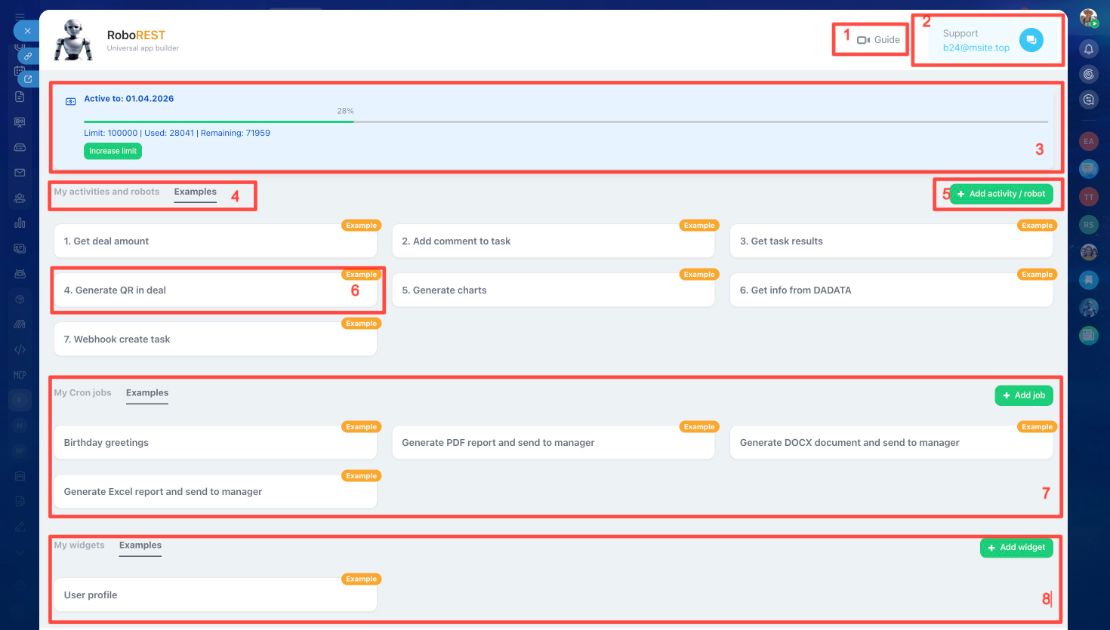
- 📘 Guide - quick link to this page.
- 💬 Support - support email and chat for setup and app usage questions.
- 📈 Limits and statistics - current request usage and available balance.
- 🤖 Robots/activities tabs - your scenarios and ready-to-use examples.
- ➕ Add - create a new robot or activity.
- 🧩 Scenario card - name, monthly run count, edit and delete buttons.
- ⏰ Cron jobs - list of scheduled tasks, their status, and launch time.
- 🪟 Widgets - created widgets and their embedding area.
 — Бесплатные Сайты и CRM.